Cisco IOSv and XE network simulation using Vagrant

Here some interesting things I did with on-demand network simulation of Cisco IOSv and IOS XE using Vagrant. Yes, Cisco has is own product for network simulation called Cisco VIRL (Cisco Virtual Internet Routing Lab) but this is not as flexible and on-demand like using Vagrant and KVM. One of the reason was to do some continuous integration testing, same what I did with Cumulus Linux: Continuous Integration and Delivery for Networking with Cumulus Linux

You need to have an active Cisco VIRL subscription to download the VMDK images or buy the Cisco CSR1000V to get access to the ISO on the Cisco website!

IOS XE was the easiest because I found a Github repository to convert an existing CSR1000V ISO to vbox image to use with Vagrant. The only thing I needed to do was to converting the vbox image to KVM using vagrant mutate.

berndonline@lab:~/cisco-lab-vagrant$ vagrant status
Current machine states:

rtr-1                     not created (libvirt)
rtr-2                     not created (libvirt)

berndonline@lab:~/cisco-lab-vagrant$ vagrant up
Bringing machine 'rtr-1' up with 'libvirt' provider...
Bringing machine 'rtr-2' up with 'libvirt' provider...
==> rtr-1: Creating image (snapshot of base box volume).
==> rtr-2: Creating image (snapshot of base box volume).
==> rtr-1: Creating domain with the following settings...
==> rtr-1:  -- Name:              cisco-lab-vagrant_rtr-1
==> rtr-2: Creating domain with the following settings...
==> rtr-1:  -- Domain type:       kvm
==> rtr-2:  -- Name:              cisco-lab-vagrant_rtr-2
==> rtr-1:  -- Cpus:              1
==> rtr-2:  -- Domain type:       kvm
==> rtr-1:  -- Feature:           acpi
==> rtr-2:  -- Cpus:              1
==> rtr-2:  -- Feature:           acpi
==> rtr-2:  -- Feature:           apic
==> rtr-1:  -- Feature:           apic
==> rtr-2:  -- Feature:           pae
==> rtr-1:  -- Feature:           pae
==> rtr-2:  -- Memory:            2048M
==> rtr-2:  -- Management MAC:
==> rtr-2:  -- Loader:
==> rtr-1:  -- Memory:            2048M
==> rtr-2:  -- Base box:          iosxe

....

==> rtr-1: Waiting for SSH to become available...
==> rtr-2: Waiting for SSH to become available...
==> rtr-1: Configuring and enabling network interfaces...
==> rtr-2: Configuring and enabling network interfaces...
    rtr-1: SSH address: 10.255.1.84:22
    rtr-1: SSH username: vagrant
    rtr-1: SSH auth method: private key
    rtr-2: SSH address: 10.255.1.208:22
    rtr-2: SSH username: vagrant
    rtr-2: SSH auth method: private key
==> rtr-1: Running provisioner: ansible...
    rtr-1: Running ansible-playbook...

PLAY [all] *********************************************************************

TASK [run show version on remote devices] **************************************
==> rtr-2: Running provisioner: ansible...
    rtr-2: Running ansible-playbook...

PLAY [all] *********************************************************************

TASK [run show version on remote devices] **************************************
ok: [rtr-1]

PLAY RECAP *********************************************************************
rtr-1                      : ok=1    changed=0    unreachable=0    failed=0

ok: [rtr-2]

PLAY RECAP *********************************************************************
rtr-2                      : ok=1    changed=0    unreachable=0    failed=0
berndonline@lab:~/cisco-lab-vagrant$ vagrant status
Current machine states:

rtr-1                     running (libvirt)
rtr-2                     running (libvirt)

berndonline@lab:~/cisco-lab-vagrant$

Afterwards you can connect with vagrant ssh to your virtual IOS XE VM:

berndonline@lab:~/cisco-lab-vagrant$ vagrant ssh rtr-1

csr1kv#show version
Cisco IOS XE Software, Version 03.16.00.S - Extended Support Release
Cisco IOS Software, CSR1000V Software (X86_64_LINUX_IOSD-UNIVERSALK9-M), Version 15.5(3)S, RELEASE SOFTWARE (fc6)
Technical Support: http://www.cisco.com/techsupport
Copyright (c) 1986-2015 by Cisco Systems, Inc.
Compiled Sun 26-Jul-15 20:16 by mcpre

Cisco IOS-XE software, Copyright (c) 2005-2015 by cisco Systems, Inc.
All rights reserved.  Certain components of Cisco IOS-XE software are
licensed under the GNU General Public License ("GPL") Version 2.0.  The
software code licensed under GPL Version 2.0 is free software that comes
with ABSOLUTELY NO WARRANTY.  You can redistribute and/or modify such
GPL code under the terms of GPL Version 2.0.  For more details, see the
documentation or "License Notice" file accompanying the IOS-XE software,
or the applicable URL provided on the flyer accompanying the IOS-XE
software.

ROM: IOS-XE ROMMON

csr1kv uptime is 9 minutes
Uptime for this control processor is 10 minutes
System returned to ROM by reload
System image file is "bootflash:packages.conf"
Last reload reason: 

....

berndonline@lab:~/cisco-lab-vagrant$ vagrant destroy
==> rtr-2: Removing domain...
==> rtr-1: Removing domain...
berndonline@lab:~/cisco-lab-vagrant$

Running IOSv on KVM wasn’t that easy because you only get VMDK (Virtual Machine Disk) which you need to convert to a QCOW2 image. The next step is to boot the QCOW2 image and add some additional configuration changes before you can use this with Vagrant. Give the VM at least 2048 MB and min. 1 vCPU.

Ones the VM is booted, connect and add the following configuration below. You need to create an vagrant user and add the ssh key from Vagrant, additionally create an EEM applet to generate the rsa key during boot otherwise Vagrant cannot connect to the VM. Afterwards save the running-config and turn off the VM:

conf t
ip vrf vrf-mgmt
	rd 1:1
	exit

interface Gig0/0
 description management
 ip vrf forwarding vrf-mgmt
 ip address dhcp
 no shutdown
 exit

ip domain-name lab.local

aaa new-model
aaa authentication login default local
aaa authorization exec default local 

username vagrant privilege 15 secret vagrant

crypto key generate rsa general-keys modulus 2048 

ip ssh version 2
ip ssh authentication-retries 5

ip ssh pubkey-chain
   username vagrant
    key-hash ssh-rsa DD3BB82E850406E9ABFFA80AC0046ED6
    exit
   exit

line vty 0 4
 exec-timeout 0 0
 transport input ssh
 exit

shell processing full

event manager session cli username vagrant
event manager applet EEM_SSH_Keygen authorization bypass

event syslog pattern SYS-5-RESTART
action 0.0 info type routername
action 0.1 set status none
action 1.0 cli command enable
action 2.0 cli command "show ip ssh | include ^SSH"
action 2.1 regexp "([ED][^ ]+)" \$_cli_result result status
action 2.2 syslog priority informational msg "SSH is currently \$status"
action 3.0 if \$status eq Disabled
action 3.1 cli command "configure terminal"
action 3.2 cli command "crypto key generate rsa usage-keys label SSHKEYS modulus 2048"
action 3.3 cli command "end"
action 3.4 cli command "copy run start"
action 3.5 syslog priority informational msg "SSH keys generated by EEM"
action 4.0 end
end

exit
write mem

Now the QCOW2 image is ready to use with Vagrant. Create an instance folder under the user vagrant directory and copy the QCOW2 image. As well create an metadata.json file:

mkdir -p ~/.vagrant.d/boxes/iosv/0/libvirt/
cp IOSv.qcow2 ~/.vagrant.d/boxes/iosv/0/libvirt/box.img
printf '{"provider":"libvirt","format":"qcow2","virtual_size":2}' > metadata.json

The IOSv image is ready to use with Vagrant, just create an Vagrantfile with the needed configuration and boot up the VMs.

berndonline@lab:~/cisco-lab-vagrant$ vagrant status
Current machine states:

rtr-1                     not created (libvirt)
rtr-2                     not created (libvirt)

berndonline@lab:~/cisco-lab-vagrant$ vagrant up
Bringing machine 'rtr-1' up with 'libvirt' provider...
Bringing machine 'rtr-2' up with 'libvirt' provider...
==> rtr-2: Creating image (snapshot of base box volume).
==> rtr-1: Creating image (snapshot of base box volume).
==> rtr-2: Creating domain with the following settings...
==> rtr-1: Creating domain with the following settings...
==> rtr-2:  -- Name:              cisco-lab-vagrant_rtr-2
==> rtr-2:  -- Domain type:       kvm
==> rtr-1:  -- Name:              cisco-lab-vagrant_rtr-1
==> rtr-2:  -- Cpus:              1
==> rtr-1:  -- Domain type:       kvm
==> rtr-2:  -- Feature:           acpi
==> rtr-1:  -- Cpus:              1
==> rtr-2:  -- Feature:           apic
==> rtr-1:  -- Feature:           acpi
==> rtr-2:  -- Feature:           pae
==> rtr-1:  -- Feature:           apic
==> rtr-2:  -- Memory:            2048M
==> rtr-1:  -- Feature:           pae
==> rtr-2:  -- Management MAC:
==> rtr-1:  -- Memory:            2048M
==> rtr-2:  -- Loader:
==> rtr-1:  -- Management MAC:
==> rtr-2:  -- Base box:          iosv
==> rtr-1:  -- Loader:
==> rtr-1:  -- Base box:          iosv

....

==> rtr-2: Waiting for SSH to become available...
==> rtr-1: Waiting for SSH to become available...
==> rtr-2: Configuring and enabling network interfaces...
==> rtr-1: Configuring and enabling network interfaces...
    rtr-2: SSH address: 10.255.1.234:22
    rtr-2: SSH username: vagrant
    rtr-2: SSH auth method: private key
    rtr-1: SSH address: 10.255.1.237:22
    rtr-1: SSH username: vagrant
    rtr-1: SSH auth method: private key
==> rtr-2: Running provisioner: ansible...
    rtr-2: Running ansible-playbook...

PLAY [all] *********************************************************************

TASK [run show version on remote devices] **************************************
Thursday 26 October 2017  18:21:22 +0200 (0:00:00.015)       0:00:00.015 ******
==> rtr-1: Running provisioner: ansible...
    rtr-1: Running ansible-playbook...

PLAY [all] *********************************************************************

TASK [run show version on remote devices] **************************************
Thursday 26 October 2017  18:21:23 +0200 (0:00:00.014)       0:00:00.014 ******
ok: [rtr-2]

PLAY RECAP *********************************************************************
rtr-2                      : ok=1    changed=0    unreachable=0    failed=0

Thursday 26 October 2017  18:21:24 +0200 (0:00:01.373)       0:00:01.388 ******
===============================================================================
run show version on remote devices -------------------------------------- 1.37s
ok: [rtr-1]

PLAY RECAP *********************************************************************
rtr-1                      : ok=1    changed=0    unreachable=0    failed=0

Thursday 26 October 2017  18:21:24 +0200 (0:00:01.380)       0:00:01.395 ******
===============================================================================
run show version on remote devices -------------------------------------- 1.38s
berndonline@lab:~/cisco-lab-vagrant$

After the VMs are successfully booted you can connect again with vagrant ssh:

berndonline@lab:~/cisco-lab-vagrant$ vagrant ssh rtr-1
**************************************************************************
* IOSv is strictly limited to use for evaluation, demonstration and IOS  *
* education. IOSv is provided as-is and is not supported by Cisco's      *
* Technical Advisory Center. Any use or disclosure, in whole or in part, *
* of the IOSv Software or Documentation to any third party for any       *
* purposes is expressly prohibited except as otherwise authorized by     *
* Cisco in writing.                                                      *
**************************************************************************
router#show version
Cisco IOS Software, IOSv Software (VIOS-ADVENTERPRISEK9-M), Version 15.6(2)T, RELEASE SOFTWARE (fc2)
Technical Support: http://www.cisco.com/techsupport
Copyright (c) 1986-2016 by Cisco Systems, Inc.
Compiled Tue 22-Mar-16 16:19 by prod_rel_team

ROM: Bootstrap program is IOSv

router uptime is 1 minute
System returned to ROM by reload
System image file is "flash0:/vios-adventerprisek9-m"
Last reload reason: Unknown reason

....

berndonline@lab:~/cisco-lab-vagrant$ vagrant destroy
==> rtr-2: Removing domain...
==> rtr-1: Removing domain...
berndonline@lab:~/cisco-lab-vagrant$

Basically thats it, your on-demand IOSv and IOS XE lab using Vagrant, ready for some automation and continuous integration testing.

The example Vagrantfiles you can find in my Github repository:

https://github.com/berndonline/cisco-lab-vagrant/blob/master/Vagrantfile-IOSXE

https://github.com/berndonline/cisco-lab-vagrant/blob/master/Vagrantfile-IOSv
Using Cumulus NetQ fabric validation with Ansible

Here a new post about Cumulus NetQ, I build a small Ansible playbook to validate the state of MLAG within a Cumulus Linux fabric using automation.

In this case I use the command “netq check clag json” to check for nodes in failed or warning state. This example can be used when doing automated changes to MLAG and to validate the configuration afterwards, or as a pre-check before I execute the main playbook.

---
- hosts: spine leaf
  gather_facts: False
  user: cumulus

  tasks:
     - name: Gather Clag info in JSON
       command: netq check clag json
       register: result
       run_once: true
       failed_when: "'ERROR' in result.stdout"

     - name: stdout string into json
       set_fact: json_output="{{result.stdout | from_json }}"
       run_once: true

     - name: output of json_output variable
       debug:
         var: json_output
       run_once: true

     - name: check failed clag members
       debug: msg="Check failed clag members"
       when: json_output["failedNodes"]|length == 0
       run_once: true

     - name: clag members status failed
       fail: msg="Device {{item['node']}}, Why node is in failed state? {{item['reason']}}"
       with_items:  "{{json_output['failedNodes']}}"
       run_once: true

     - name: clag members status warning
       fail: msg="Device {{item['node']}}, Why node is in warning state? {{item['reason']}}"
       when: json_output["warningNodes"] is defined
       with_items:  "{{json_output['warningNodes']}}"
       run_once: true

Here the output when MLAG is healthy:

PLAY [spine leaf] *********************************************************************************************************************************************************************************************************************

TASK [Gather Clag info in JSON] *******************************************************************************************************************************************************************************************************
Friday 20 October 2017  17:56:35 +0200 (0:00:00.017)       0:00:00.017 ********
changed: [spine-1]

TASK [stdout string into json] ********************************************************************************************************************************************************************************************************
Friday 20 October 2017  17:56:35 +0200 (0:00:00.325)       0:00:00.343 ********
ok: [spine-1]

TASK [output of json_output variable] *************************************************************************************************************************************************************************************************
Friday 20 October 2017  17:56:35 +0200 (0:00:00.010)       0:00:00.353 ********
ok: [spine-1] => {
    "json_output": {
        "failedNodes": [],
        "summary": {
            "checkedNodeCount": 4,
            "failedNodeCount": 0,
            "warningNodeCount": 0
        }
    }
}

TASK [check failed clag members] ******************************************************************************************************************************************************************************************************
Friday 20 October 2017  17:56:35 +0200 (0:00:00.010)       0:00:00.363 ********
ok: [spine-1] => {
    "msg": "Check failed clag members"
}

TASK [clag members status failed] *****************************************************************************************************************************************************************************************************
Friday 20 October 2017  17:56:35 +0200 (0:00:00.011)       0:00:00.374 ********

TASK [clag members status warning] ****************************************************************************************************************************************************************************************************
Friday 20 October 2017  17:56:35 +0200 (0:00:00.007)       0:00:00.382 ********
skipping: [spine-1]

PLAY RECAP ****************************************************************************************************************************************************************************************************************************
spine-1                    : ok=4    changed=1    unreachable=0    failed=0

Friday 20 October 2017  17:56:35 +0200 (0:00:00.008)       0:00:00.391 ********
===============================================================================
Gather Clag info in JSON ------------------------------------------------ 0.33s
check failed clag members ----------------------------------------------- 0.01s
stdout string into json ------------------------------------------------- 0.01s
output of json_output variable ------------------------------------------ 0.01s
clag members status warning --------------------------------------------- 0.01s
clag members status failed ---------------------------------------------- 0.01s

In the following example leaf-1 node is in warning state because of a missing “clagd-backup-ip“, another warning could be also a single attached bond interface:

PLAY [spine leaf] *********************************************************************************************************************************************************************************************************************

TASK [Gather Clag info in JSON] *******************************************************************************************************************************************************************************************************
Friday 20 October 2017  18:02:05 +0200 (0:00:00.016)       0:00:00.016 ********
changed: [spine-1]

TASK [stdout string into json] ********************************************************************************************************************************************************************************************************
Friday 20 October 2017  18:02:05 +0200 (0:00:00.225)       0:00:00.241 ********
ok: [spine-1]

TASK [output of json_output variable] *************************************************************************************************************************************************************************************************
Friday 20 October 2017  18:02:05 +0200 (0:00:00.010)       0:00:00.251 ********
ok: [spine-1] => {
    "json_output": {
        "failedNodes": [],
        "summary": {
            "checkedNodeCount": 4,
            "failedNodeCount": 0,
            "warningNodeCount": 1
        },
        "warningNodes": [
            {
                "node": "leaf-1",
                "reason": "Backup IP Failed"
            }
        ]
    }
}

TASK [check failed clag members] ******************************************************************************************************************************************************************************************************
Friday 20 October 2017  18:02:05 +0200 (0:00:00.010)       0:00:00.261 ********
ok: [spine-1] => {
    "msg": "Check failed clag members"
}

TASK [clag members status failed] *****************************************************************************************************************************************************************************************************
Friday 20 October 2017  18:02:05 +0200 (0:00:00.011)       0:00:00.273 ********

TASK [clag members status warning] ****************************************************************************************************************************************************************************************************
Friday 20 October 2017  18:02:05 +0200 (0:00:00.007)       0:00:00.281 ********
failed: [spine-1] (item={u'node': u'leaf-1', u'reason': u'Backup IP Failed'}) => {"failed": true, "item": {"node": "leaf-1", "reason": "Backup IP Failed"}, "msg": "Device leaf-1, Why node is in warning state? Backup IP Failed"}

NO MORE HOSTS LEFT ********************************************************************************************************************************************************************************************************************
	to retry, use: --limit @/home/berndonline/cumulus-lab-vagrant/netq_check_clag.retry

PLAY RECAP ****************************************************************************************************************************************************************************************************************************
spine-1                    : ok=4    changed=1    unreachable=0    failed=1

Friday 20 October 2017  18:02:05 +0200 (0:00:00.015)       0:00:00.297 ********
===============================================================================
Gather Clag info in JSON ------------------------------------------------ 0.23s
clag members status warning --------------------------------------------- 0.02s
check failed clag members ----------------------------------------------- 0.01s
output of json_output variable ------------------------------------------ 0.01s
stdout string into json ------------------------------------------------- 0.01s
clag members status failed ---------------------------------------------- 0.01s

Another example is that NetQ reports about a problem that leaf-1 has no matching clagid on peer, in this case on leaf-2 the interface bond1 is missing in the configuration:

PLAY [spine leaf] ***********************************************************************************************************************************************************************************************************************

TASK [Gather Clag info in JSON] *********************************************************************************************************************************************************************************************************
Monday 23 October 2017  18:49:15 +0200 (0:00:00.016)       0:00:00.016 ********
changed: [spine-1]

TASK [stdout string into json] **********************************************************************************************************************************************************************************************************
Monday 23 October 2017  18:49:15 +0200 (0:00:00.223)       0:00:00.240 ********
ok: [spine-1]

TASK [output of json_output variable] ***************************************************************************************************************************************************************************************************
Monday 23 October 2017  18:49:15 +0200 (0:00:00.010)       0:00:00.250 ********
ok: [spine-1] => {
    "json_output": {
        "failedNodes": [
            {
                "node": "leaf-1",
                "reason": "Conflicted Bonds: bond1:matching clagid not configured on peer"
            }
        ],
        "summary": {
            "checkedNodeCount": 4,
            "failedNodeCount": 1,
            "warningNodeCount": 1
        },
        "warningNodes": [
            {
                "node": "leaf-1",
                "reason": "Singly Attached Bonds: bond1"
            }
        ]
    }
}

TASK [check failed clag members] ********************************************************************************************************************************************************************************************************
Monday 23 October 2017  18:49:15 +0200 (0:00:00.010)       0:00:00.260 ********
skipping: [spine-1]

TASK [clag members status failed] *******************************************************************************************************************************************************************************************************
Monday 23 October 2017  18:49:15 +0200 (0:00:00.009)       0:00:00.269 ********
failed: [spine-1] (item={u'node': u'leaf-1', u'reason': u'Conflicted Bonds: bond1:matching clagid not configured on peer'}) => {"failed": true, "item": {"node": "leaf-1", "reason": "Conflicted Bonds: bond1:matching clagid not configured on peer"}, "msg": "Device leaf-1, Why node is in failed state? Conflicted Bonds: bond1:matching clagid not configured on peer"}

NO MORE HOSTS LEFT **********************************************************************************************************************************************************************************************************************
	to retry, use: --limit @/home/berndonline/cumulus-lab-vagrant/netq_check_clag.retry

PLAY RECAP ******************************************************************************************************************************************************************************************************************************
spine-1                    : ok=3    changed=1    unreachable=0    failed=1

Monday 23 October 2017  18:49:15 +0200 (0:00:00.014)       0:00:00.284 ********
===============================================================================
Gather Clag info in JSON ------------------------------------------------ 0.22s
clag members status failed ---------------------------------------------- 0.02s
stdout string into json ------------------------------------------------- 0.01s
output of json_output variable ------------------------------------------ 0.01s
check failed clag members ----------------------------------------------- 0.01s

This is just an example to show what possibilities I have with Cumulus NetQ when I use automation to validate my changes.

There are some information in the Cumulus NetQ documentation about, taking preventive steps with your network: https://docs.cumulusnetworks.com/display/NETQ/Taking+Preventative+Steps+with+Your+Network

Cumulus Linux Ethernet link-state monitoring using ifplugd

This blog post is about link-state monitoring under Cumulus Linux. Cumulus has no own builtin tool for this and recommends using ifplugd. The tool has some similarities to Cisco’s IP SLA which can track the state of interfaces.

The main reason to use ifplugd is for split-brain scenarios, when you lose the peerlink between Cumulus Linux CLAG pairs. If the peerlink goes down the CLAG primary switch stays active member and the secondary would automatically disable all CLAG bonds to force the connected servers to failover to the CLAG primary switch to keep the network operational. 

Very important you need to configure clagd-backup-ip because this is needed for Cumulus Linux to still be able to communicate to it’s neighbour if they lose the peerlink.

Now ifplugd is important for all connected servers which are not using CLAG bonds, basically servers which are using the normal active/standby teaming which doesn’t require a CLAG bonding configuration. These ports are configured as normal access ports, so an peerlink failure would normally keep these ports up if you don’t configure ifplugd.

Ifplugd needs to be installed and configured on both switches running CLAG, follow the steps below.

Install ifplugd service:

sudo apt-get update
sudo apt-get install ifplugd

Edit the file /etc/default/ifplugd and add the lines below

The delay is set to -d10 moderate 10 seconds because of combination with CLAG. Need to see and lower the value over time.

INTERFACES="peerlink"
HOTPLUG_INTERFACES=""
ARGS="-q -f -u0 -d10 -w -I"
SUSPEND_ACTION="stop"

Edit the file /etc/ifplugd/action.d/ifupdown

The variable $SWITCHPORTS defines which ports ifplugd should shutdown if the peerlink goes down. We came up with to use a custom variable instead of shutting down all ports because CLAG is taking care of configured bonds.

#!/bin/sh

# The peerlink bond interface
PEERLINK=peerlink

# The switchports to bring down on peerlink failure
#
# enslosures 01/02: swp5..swp8
SWITCHPORTS=$(seq -f swp%g 5 8)
# storage system 01/02 : swp19..swp22
SWITCHPORTS="$SWITCHPORTS $(seq -f swp%g 19 22)"
# server1/server2: swp27..swp28
SWITCHPORTS="$SWITCHPORTS $(seq -f swp%g 27 28)"
# VMware cluster: swp35..swp38
SWITCHPORTS="$SWITCHPORTS $(seq -f swp%g 35 38)"

case "$1" in

    "$PEERLINK")
        clagrole=$(clagctl | grep "Our Priority" | awk '{print $8}')
	case "$2" in
	    up | down)
		action=$2
		if [ "$clagrole" = "secondary" ]; then
		    for interface in $SWITCHPORTS; do
			echo "bringing $action : $interface"
			ip link set $interface $action
		    done
		fi
		;;
	esac
	;;

esac

Start ifplugd service

sudo systemctl restart ifplugd.service

Impact of a simulated peerlink failure from the server perspective:

2017-09-19T11:43:15.665057+00:00 leaf-01-c ifplugd(peerlink)[5292]: Link beat lost.
2017-09-19T11:43:25.775585+00:00 leaf-01-c ifplugd(peerlink)[5292]: Executing '/etc/ifplugd/ifplugd.action peerlink down'.
2017-09-19T11:43:25.902637+00:00 leaf-01-c ifplugd(peerlink)[5292]: Program executed successfully.
root@leaf-01-c:/home/cumulus# 

root@leaf-02-c:/home/cumulus# grep ifplugd /var/log/syslog
[...]
2017-09-19T11:43:15.780727+00:00 leaf-02-c ifplugd(peerlink)[12600]: Link beat lost.
2017-09-19T11:43:25.891584+00:00 leaf-02-c ifplugd(peerlink)[12600]: Executing '/etc/ifplugd/ifplugd.action peerlink down'.
2017-09-19T11:43:26.107140+00:00 leaf-02-c ifplugd(peerlink)[12600]: client: bringing down : swp5
2017-09-19T11:43:26.146421+00:00 leaf-02-c ifplugd(peerlink)[12600]: client: bringing down : swp6
2017-09-19T11:43:26.171454+00:00 leaf-02-c ifplugd(peerlink)[12600]: client: bringing down : swp7
2017-09-19T11:43:26.193387+00:00 leaf-02-c ifplugd(peerlink)[12600]: client: bringing down : swp8
64 bytes from 8.8.8.8: icmp_seq=1623 ttl=59 time=0.524 ms
64 bytes from 8.8.8.8: icmp_seq=1624 ttl=59 time=0.782 ms
64 bytes from 8.8.8.8: icmp_seq=1625 ttl=59 time=0.847 ms
Request timeout for icmp_seq 1626
Request timeout for icmp_seq 1627
Request timeout for icmp_seq 1628
Request timeout for icmp_seq 1629
Request timeout for icmp_seq 1630
Request timeout for icmp_seq 1631
Request timeout for icmp_seq 1632
Request timeout for icmp_seq 1633
Request timeout for icmp_seq 1634
Request timeout for icmp_seq 1635
Request timeout for icmp_seq 1636
Request timeout for icmp_seq 1637
Request timeout for icmp_seq 1638
64 bytes from 8.8.8.8: icmp_seq=1639 ttl=59 time=0.701 ms
64 bytes from 8.8.8.8: icmp_seq=1640 ttl=59 time=0.708 ms
64 bytes from 8.8.8.8: icmp_seq=1641 ttl=59 time=0.780 ms
64 bytes from 8.8.8.8: icmp_seq=1642 ttl=59 time=0.781 ms

Impact of reconnecting the peerlink from the server perspective:

root@leaf-01-c:/home/cumulus# grep ifplugd /var/log/syslog
[...]
2017-09-19T11:48:22.190187+00:00 leaf-01-c ifplugd(peerlink)[5292]: Link beat detected.
2017-09-19T11:48:22.290481+00:00 leaf-01-c ifplugd(peerlink)[5292]: Executing '/etc/ifplugd/ifplugd.action peerlink up'.
2017-09-19T11:48:22.524673+00:00 leaf-01-c ifplugd(peerlink)[5292]: Program executed successfully.

root@leafsw-f24-02-c:/home/cumulus# grep ifplugd /var/log/syslog
[...]
2017-09-19T11:48:22.084477+00:00 leaf-02-c ifplugd(peerlink)[12600]: Link beat detected.
2017-09-19T11:48:22.232192+00:00 leaf-02-c ifplugd(peerlink)[12600]: Executing '/etc/ifplugd/ifplugd.action peerlink up'.
2017-09-19T11:48:22.812771+00:00 leaf-02-c ifplugd(peerlink)[12600]: client: bringing up : swp5
2017-09-19T11:48:22.816175+00:00 leaf-02-c ifplugd(peerlink)[12600]: client: bringing up : swp6
2017-09-19T11:48:22.831487+00:00 leaf-02-c ifplugd(peerlink)[12600]: client: bringing up : swp7
2017-09-19T11:48:22.836617+00:00 leaf-02-c ifplugd(peerlink)[12600]: client: bringing up : swp8
64 bytes from 8.8.8.8: icmp_seq=24 ttl=59 time=0.614 ms
64 bytes from 8.8.8.8: icmp_seq=25 ttl=59 time=0.680 ms
64 bytes from 8.8.8.8: icmp_seq=26 ttl=59 time=8.932 ms
64 bytes from 8.8.8.8: icmp_seq=27 ttl=59 time=1.126 ms
64 bytes from 8.8.8.8: icmp_seq=28 ttl=59 time=2.424 ms
Request timeout for icmp_seq 29
Request timeout for icmp_seq 30
Request timeout for icmp_seq 31
Request timeout for icmp_seq 32
Request timeout for icmp_seq 33
Request timeout for icmp_seq 34
Request timeout for icmp_seq 35
64 bytes from 8.8.8.8: icmp_seq=36 ttl=59 time=6.491 ms
64 bytes from 8.8.8.8: icmp_seq=37 ttl=59 time=1.045 ms
64 bytes from 8.8.8.8: icmp_seq=38 ttl=59 time=1.244 ms

Yes, it takes a few seconds for your server to reconnect if you have a peerlink failure but it is very important to keep the datacenter network operational.

For more information have a look at the Cumulus Linux documentation: https://docs.cumulusnetworks.com/display/DOCS/ifplugd

Cumulus Linux non-disruptive upgrade procedure on MLAG pairs

I thought it would be useful to know the exact procedure for non-disruptive upgrade on Cumulus Linux MLAG – CLAG pairs. I find the online documentation Upgrading Cumulus Linux a bit short when it comes to running CLAG in what order you have to upgrade the switches with a minimal disruption of traffic..

The following procedure below worked for me on Dell S4048-ON and Dell S3048-ON switches

  • On both switches, run the following command to refresh the package index of the apt repository:
sudo apt-get update
  • Run the following command to determine which switch is CLAG primary- and which switch CLAG secondary:
sudo net show clag

Start upgrading the secondary CLAG member:

  • Shutdown on all interfaces except the peerlink using the commands below.  This will force all traffic through the other switch:
echo swp{1..52} | tr ' ' '\n' | sudo xargs -i ip link set {} down
64 bytes from 8.8.8.8: icmp_seq=8903 ttl=59 time=1.106 ms
64 bytes from 8.8.8.8: icmp_seq=8904 ttl=59 time=0.974 ms
64 bytes from 8.8.8.8: icmp_seq=8905 ttl=59 time=1.643 ms
64 bytes from 8.8.8.8: icmp_seq=8906 ttl=59 time=0.869 ms
Request timeout for icmp_seq 8907
64 bytes from 8.8.8.8: icmp_seq=8908 ttl=59 time=1.256 ms
64 bytes from 8.8.8.8: icmp_seq=8909 ttl=59 time=0.769 ms

(Rollback) If problems are seen revert the change, the commands shown:

echo swp{1..52} | tr ' ' '\n' | sudo xargs -i ip link set {} up

Wait one minute for CLAG to stabilise and verify network communication with the remaining switch.

  • Perform a clean shutdown of clagd on this switch
sudo systemctl stop clagd

(Rollback) If you see problems start clagd again:

sudo systemctl start clagd

Wait one minute for CLAG to cleanly shut down

  • Shutdown peerlink bond
sudo ip link set peerlink down

(Rollback) If you see problems enable peerlink again:

sudo ip link set peerlink up
  • Perform the upgrade using the command:
sudo apt-get upgrade

The reason why it is important to do a clean shutdown of all the ports is that the bridge and peerlink bounces during the package upgrade which could affect the network communication if this happens uncontrolled.

  • Reboot the switch using the command
sudo reboot

Wait for the upgraded switch to come up. This will cause a short outage in traffic.

64 bytes from 8.8.8.8: icmp_seq=9443 ttl=59 time=1.069 ms
64 bytes from 8.8.8.8: icmp_seq=9444 ttl=59 time=1.150 ms
64 bytes from 8.8.8.8: icmp_seq=9445 ttl=59 time=0.993 ms
64 bytes from 8.8.8.8: icmp_seq=9446 ttl=59 time=1.331 ms
Request timeout for icmp_seq 9447
Request timeout for icmp_seq 9448
Request timeout for icmp_seq 9449
64 bytes from 8.8.8.8: icmp_seq=9450 ttl=59 time=1.539 ms
64 bytes from 8.8.8.8: icmp_seq=9451 ttl=59 time=0.908 ms
64 bytes from 8.8.8.8: icmp_seq=9452 ttl=59 time=1.166 ms
64 bytes from 8.8.8.8: icmp_seq=9453 ttl=59 time=1.261 ms

Wait until the network is functioning normally again.

On the secondary, run the following command to take over the primary role:

sudo clagctl priority 0

Wait one minute for CLAG to failvoer

Verify that the CLAG handover has occurred:

sudo net show clag

Repeat steps on the new secondary (old primary) to shutdown all interfaces.

Ones finished you need to reset the clag priority on the primary to its configured default value.

Read my next post, how to rollback if an upgrade failed: Cumulus Linux Snapshot Rollback

Continuous Integration and Delivery for Networking with Cumulus Linux

Continuous Integration – Continuous Delivery (CICD) is becoming more and more popular for network automation but the problem is how to validate your scripts and stage the configuration because you don’t want to deploy untested code to a production system. Especially in networking that could be pretty destructive if you made a mistake which could cause a loss in connectivity.

I spend some days working on a Cumulus Linux lab using Vagrant which I use to stage configuration. You find the basic Ansible playbook and the gitlab-ci configuration for the Cumulus lab in my Github repo: cumulus-lab-provision

For the continuous integration and delivery (CI/CD) pipeline I am using Gitlab.com and their Gitlab-runner which is running on my server. I will not get into too much detail what is needed on the server, basically it runs vargant, libvirt (kvm), virtualbox, ansible and the gitlab-runner.

  • You need to register your Gitlab-runner with the Gitlab repository.

  • The next step is to create your .gitlab-ci.yml which defines your CI-pipeline.
---
stages:
    - validate ansible
    - staging
    - production
validate:
    stage: validate ansible
    script:
        - bash ./linter.sh
staging:
    before_script:
        - git clone https://github.com/berndonline/cumulus-lab-vagrant.git
        - cd cumulus-lab-vagrant/
        - python ./topology_converter.py ./topology-staging.dot
          -p libvirt --ansible-hostfile
    stage: staging
    script:
        - bash ../staging.sh
production:
    before_script:
        - git clone https://github.com/berndonline/cumulus-lab-vagrant.git
        - cd cumulus-lab-vagrant/
        - python ./topology_converter.py ./topology-production.dot
          -p libvirt --ansible-hostfile
    stage: production
    when: manual
    script:
        - bash ../production.sh
    only:
        - master

In the gitlab-ci you see that I clone the cumulus vagrant lab which I use to spin-up a virtual staging environment and run the Ansible playbook against the virtual lab. The production stage is in my example also a vagrant environment because I had no physical switches for testing.

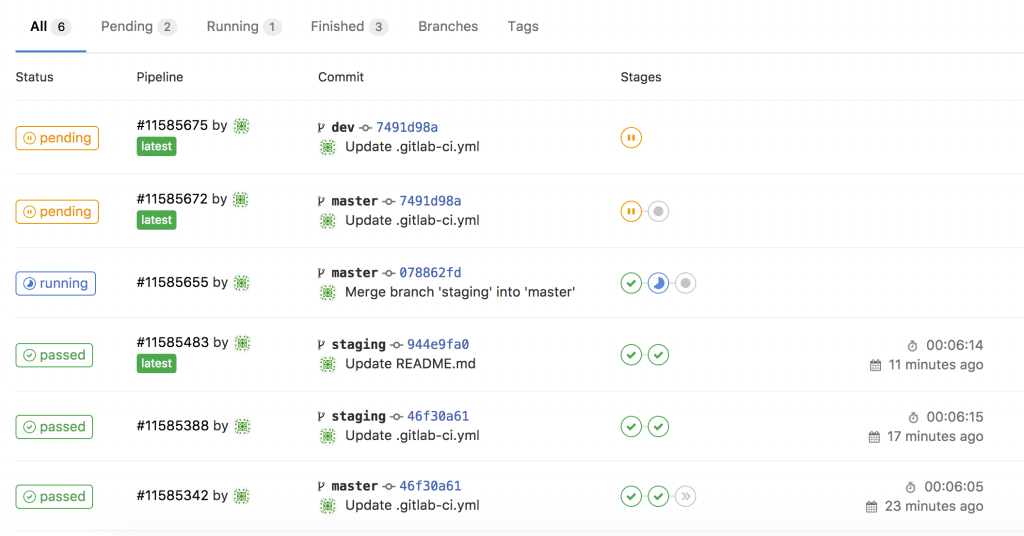
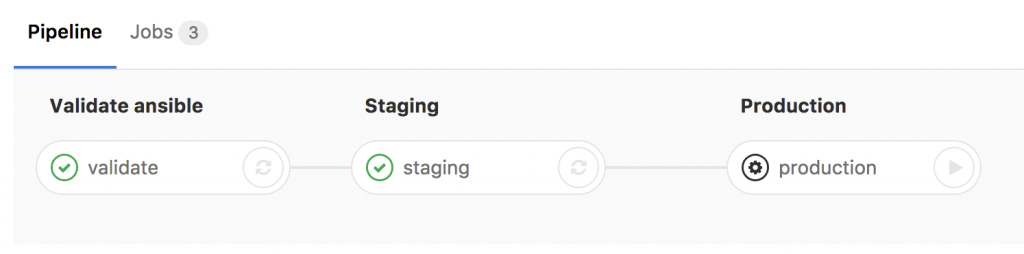
  • Basically any commit or merge in the Gitlab repo triggers the pipeline which I define in the gitlab-ci.

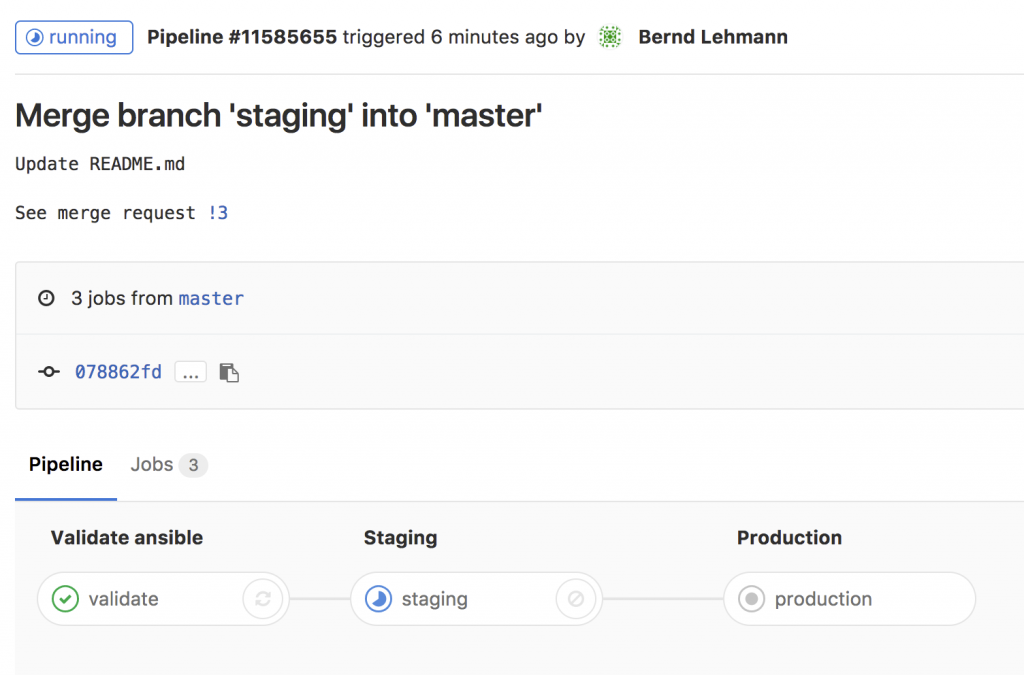
  • You can see the details in the running job. The first stage is only to validate that the YAML files have the correct syntax.

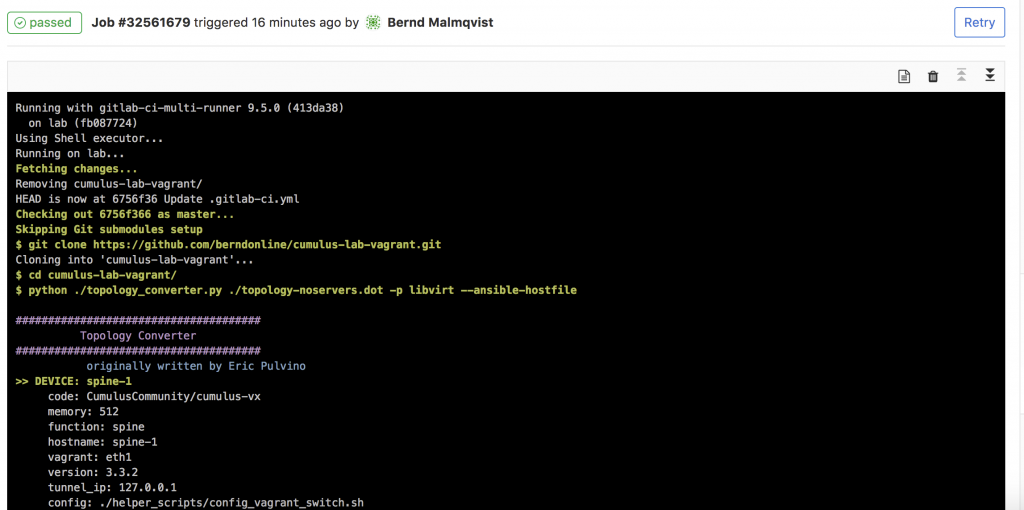
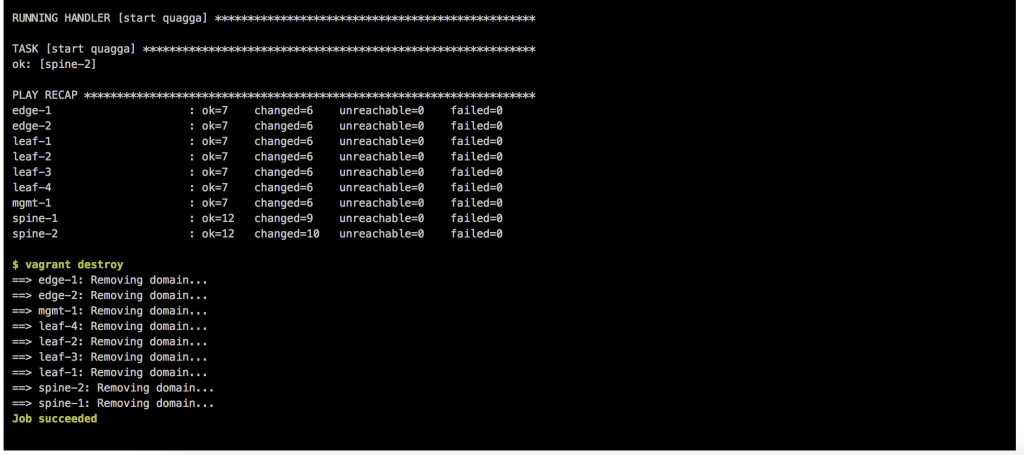
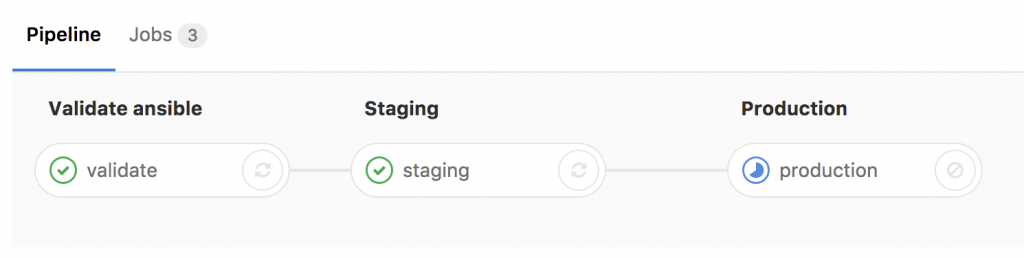
  • Here the details of the running job of staging and when everything goes well the job succeeded.

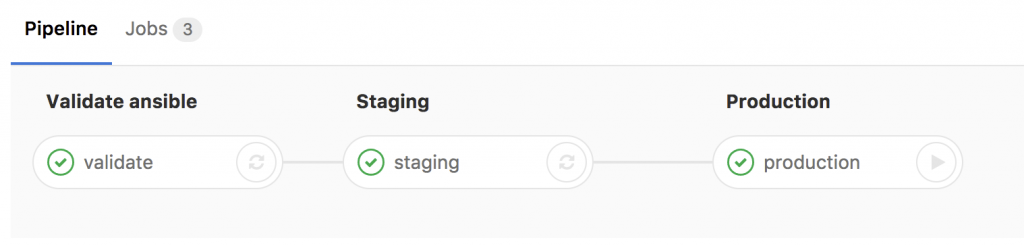
  • The last stage is production which needs to be triggered manually.

  • After the changes run through all defined stages you see that you successfully validate, staged and deployed your configuration to a cumulus production system.

This is a complete different way of working for a network engineer but the way it goes in fully automated datacenter network environments. It gets very powerful when you combine this with the Cumulus NetQ server to validate the state of your switch fabric after you run changes in production.

The next topic I am working on, is using Cumulus NetQ to validate configuration changes.

Here again my two repositories I use:

https://github.com/berndonline/cumulus-lab-vagrant

https://github.com/berndonline/cumulus-lab-provision

Read my new posts about an Ansible Playbook for Cumulus Linux BGP IP-Fabric and Cumulus NetQ Validation and BGP EVPN and VXLAN with Cumulus Linux.