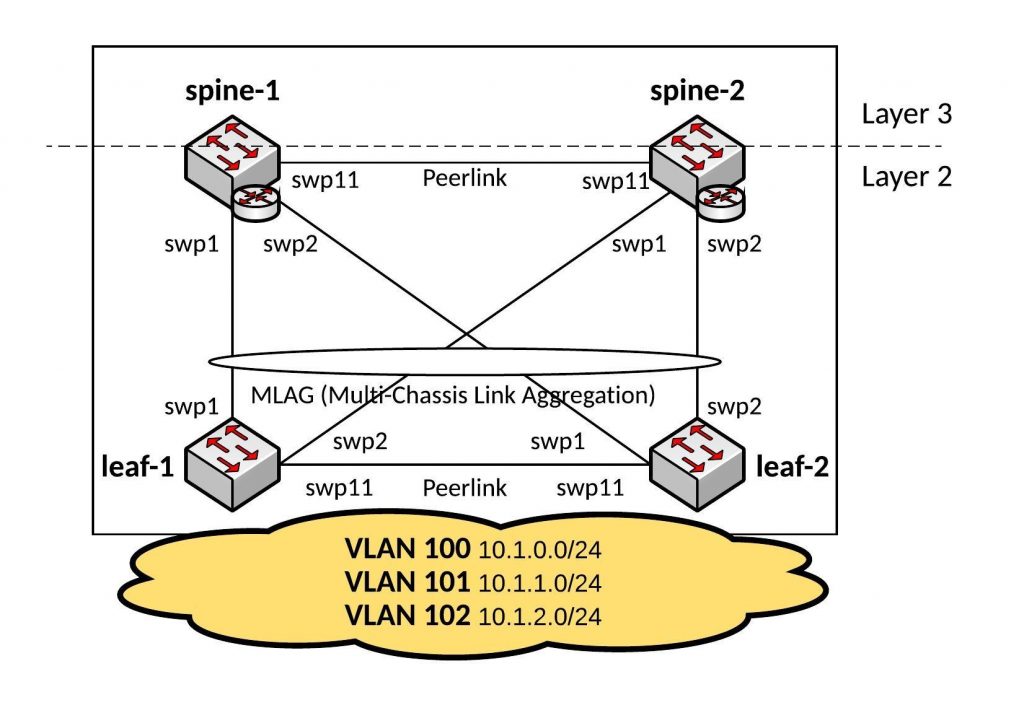
Like promised, here a basic Ansible Playbook for a Cumulus Linux Layer 3 Fabric running BGP which you see in large-scale data centre deployments.
You push the layer 2 network as close as possible to the server and use ECMP (Equal-cost multi-path) routing to distribute your traffic via multiple uplinks.
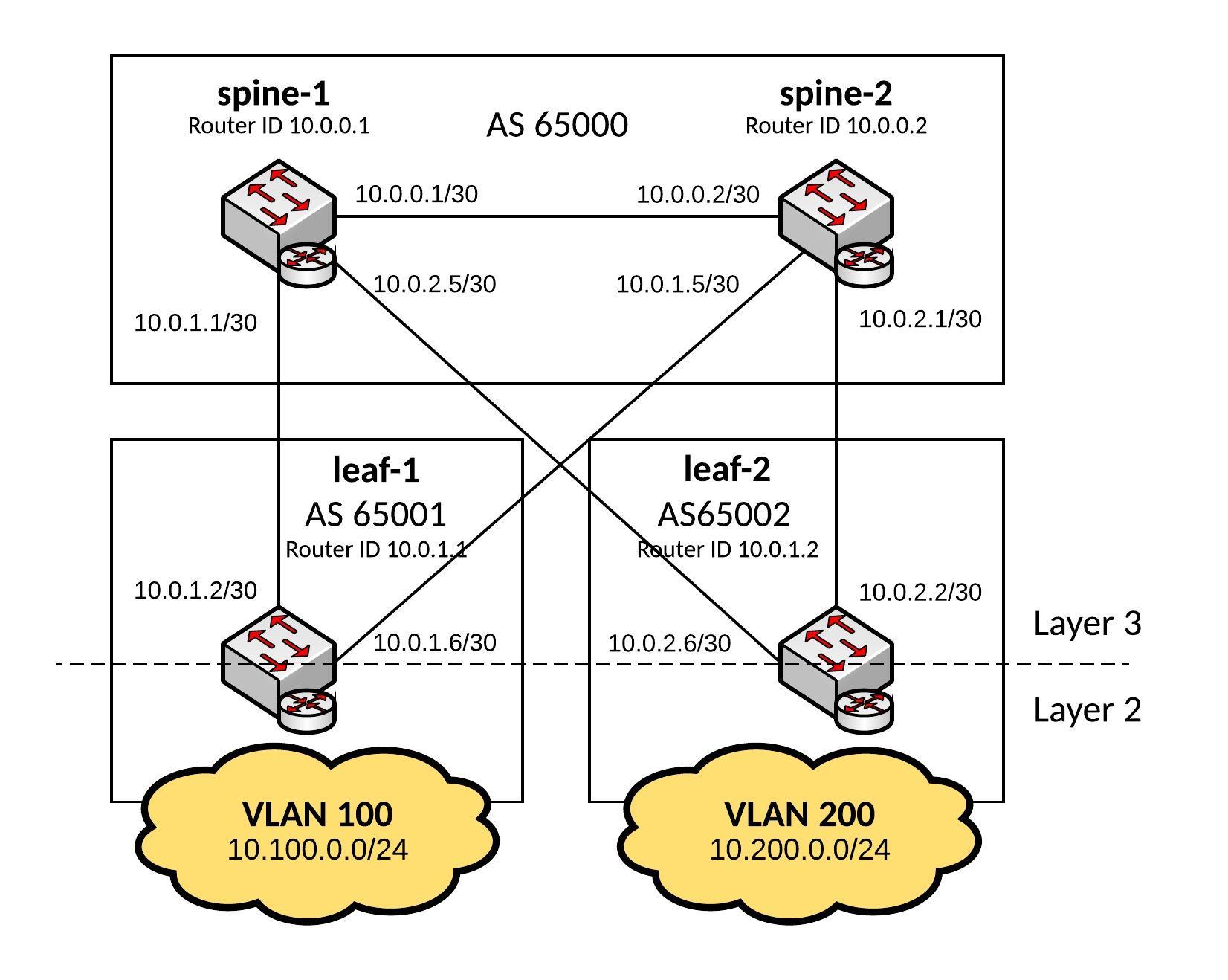
These kind of network designs are highly scalable and in my example a 2-Tier deployment but you can easily use 3-Tiers where the Leaf switches become the distribution layer and you add additional ToR (Top of Rack) switches.
Here some interesting information about Facebook’s next-generation data centre fabric: Introducing data center fabric, the next-generation Facebook data center network
I use the same hosts file like from my previous blog post Ansible Playbook for Cumulus Linux (Layer 2 Fabric)
Hosts file:
[spine]
spine-1
spine-2
[leaf]
leaf-1
leaf-2
Ansible Playbook:
---
- hosts: all
  remote_user: cumulus
  gather_facts: no
  become: yes
  vars:
    ansible_become_pass: "CumulusLinux!"
    spine_interfaces:
      - { port: swp1, desc: leaf-1, address: "{{ swp1_address}}" }
      - { port: swp2, desc: leaf-2, address: "{{ swp2_address}}" }
      - { port: swp6, desc: layer3_peerlink, address: "{{ peer_address}}" }
    leaf_interfaces:
      - { port: swp1, desc: spine-1, address: "{{ swp1_address}}" }
      - { port: swp2, desc: spine-2, address: "{{ swp2_address}}" }
  handlers:
    - name: ifreload
      command: ifreload -a
    - name: restart quagga
      service: name=quagga state=restarted
  tasks:
    - name: deploys spine interface configuration
      template: src=templates/spine_routing_interfaces.j2 dest=/etc/network/interfaces
      when: "'spine' in group_names"
      notify: ifreload
    - name: deploys leaf interface configuration
      template: src=templates/leaf_routing_interfaces.j2 dest=/etc/network/interfaces
      when: "'leaf' in group_names"
      notify: ifreload
    - name: deploys quagga configuration
      template: src=templates/quagga.conf.j2 dest=/etc/quagga/Quagga.conf
      notify: restart quagga
Let’s run the Playbook and see the output:
[root@ansible cumulus]$ ansible-playbook routing.yml -i hosts

PLAY [all] *********************************************************************

TASK [deploys spine interface configuration] ***********************************
skipping: [leaf-2]
skipping: [leaf-1]
changed: [spine-2]
changed: [spine-1]

TASK [deploys leaf interface configuration] ************************************
skipping: [spine-1]
skipping: [spine-2]
changed: [leaf-2]
changed: [leaf-1]

TASK [deploys quagga configuration] ********************************************
changed: [leaf-2]
changed: [spine-2]
changed: [spine-1]
changed: [leaf-1]

RUNNING HANDLER [ifreload] *****************************************************
changed: [leaf-2]
changed: [leaf-1]
changed: [spine-2]
changed: [spine-1]

RUNNING HANDLER [restart quagga] ***********************************************
changed: [leaf-1]
changed: [leaf-2]
changed: [spine-1]
changed: [spine-2]

PLAY RECAP *********************************************************************
leaf-1                     : ok=4    changed=4    unreachable=0    failed=0
leaf-2                     : ok=4    changed=4    unreachable=0    failed=0
spine-1                    : ok=4    changed=4    unreachable=0    failed=0
spine-2                    : ok=4    changed=4    unreachable=0    failed=0

[roote@ansible cumulus]$
To verify the configuration let’s look at the BGP routes on the leaf switches:
root@leaf-1:/home/cumulus# net show route bgp
RIB entry for bgp
=================
Codes: K - kernel route, C - connected, S - static, R - RIP,
       O - OSPF, I - IS-IS, B - BGP, P - PIM, T - Table, v - VNC,
       V - VPN,
       > - selected route, * - FIB route

B>* 10.0.0.0/30 [20/0] via 10.0.1.1, swp1, 00:02:14
  *                    via 10.0.1.5, swp2, 00:02:14
B   10.0.1.0/30 [20/0] via 10.0.1.1 inactive, 00:02:14
                       via 10.0.1.5, swp2, 00:02:14
B   10.0.1.4/30 [20/0] via 10.0.1.5 inactive, 00:02:14
                       via 10.0.1.1, swp1, 00:02:14
B>* 10.0.2.0/30 [20/0] via 10.0.1.5, swp2, 00:02:14
  *                    via 10.0.1.1, swp1, 00:02:14
B>* 10.0.2.4/30 [20/0] via 10.0.1.1, swp1, 00:02:14
  *                    via 10.0.1.5, swp2, 00:02:14
B>* 10.200.0.0/24 [20/0] via 10.0.1.1, swp1, 00:02:14
  *                      via 10.0.1.5, swp2, 00:02:14
root@leaf-1:/home/cumulus#
root@leaf-2:/home/cumulus# net show route bgp
RIB entry for bgp
=================
Codes: K - kernel route, C - connected, S - static, R - RIP,
       O - OSPF, I - IS-IS, B - BGP, P - PIM, T - Table, v - VNC,
       V - VPN,
       > - selected route, * - FIB route

B>* 10.0.0.0/30 [20/0] via 10.0.2.5, swp1, 00:02:22
  *                    via 10.0.2.1, swp2, 00:02:22
B>* 10.0.1.0/30 [20/0] via 10.0.2.5, swp1, 00:02:22
  *                    via 10.0.2.1, swp2, 00:02:22
B>* 10.0.1.4/30 [20/0] via 10.0.2.1, swp2, 00:02:22
  *                    via 10.0.2.5, swp1, 00:02:22
B   10.0.2.0/30 [20/0] via 10.0.2.1 inactive, 00:02:22
                       via 10.0.2.5, swp1, 00:02:22
B   10.0.2.4/30 [20/0] via 10.0.2.5 inactive, 00:02:22
                       via 10.0.2.1, swp2, 00:02:22
B>* 10.100.0.0/24 [20/0] via 10.0.2.5, swp1, 00:02:22
  *                      via 10.0.2.1, swp2, 00:02:22
root@leaf-2:/home/cumulus#
Have fun!
Read my new post about an Ansible Playbook for Cumulus Linux BGP IP-Fabric and Cumulus NetQ Validation.